Summary
This post shows how to bring every layer of your data center, from utility feeds to Slurm jobs, onto one clock and into one store using Telegraf and InfluxDB 3. Catch failing hardware, cooling drift, and power swings before they turn into outages.
Table of Contents
A decade ago, a typical enterprise rack drew five to ten kilowatts and was cooled by air. Today, reference designs for liquid-cooled AI racks run up to 132 kW per rack, and a large training cluster can swing a facility’s power draw by megawatts in a few seconds. More than half of operators in Uptime Institute’s 2026 survey built or upgraded high-density space in the past year, and 70% plan to in the next year as well. The entire industry is changing as AI-focused workloads become more common.
Telemetry is how operators see what all that hardware is doing. Most data centers already collect a great deal of it. The trouble is that this data lives in different systems, at different resolutions, with different clocks, owned by different teams. In a data center running AI workloads, where a cooling problem can surface as a slow training job, that fragmentation makes problems difficult to trace. Handling this new set of problems requires a different approach and different tools.
What is data center telemetry?
Data center telemetry is the continuous, time-stamped measurement of every layer of a data center, from the utility feed to the training job. It is used for three things:
- Monitoring: dashboards, threshold alerts, and on-call response
- Automation: actions taken on the data, like draining an unhealthy node or flagging a rack whose coolant flow is drifting
- Planning: capacity, power provisioning, forecasting, hardware replacement, and contract evidence, all built on history
It helps to think of telemetry in seven layers. The first three belong to the facility (operational technology, or OT). The last four belong to the IT stack.
| Layer | Signals | Sources |
|---|---|---|
| Power | Utility feeds, switchgear, UPS state of charge and battery health, and PDU branch-circuit load | EPMS, power meters, SNMP, Modbus |
| Cooling | Supply and return temperatures, chilled water, CDU flow, pressure, leak detection, coolant conductivity | BMS, SCADA |
| Environment | Rack inlet temperature, humidity, differential pressure, airflow | Sensors, DCIM tools |
| Compute | CPU, memory, fans, power supplies, firmware events | Host agents, BMC (Redfish, IPMI) |
| Accelerators | GPU power, clocks, temperature, ECC errors, HBM row remapping, NVLink errors, XID events | NVIDIA DCGM |
| Network | Port counters, congestion, pause frames, link flaps, InfiniBand error counters | gNMI streaming, SNMP, NVIDIA UFM, NetQ |
| Workload | Job starts/ends, checkpoints, node drains, queue state | Slurm, Kubernetes |
How AI changed data center telemetry
At AI rack power levels, air cooling stops being enough and liquid cooling becomes mandatory. That adds a new set of plumbing signals to watch like flow balance across compute trays, pressure drop across filters, coolant chemistry and hundreds of quick-disconnect fittings per rack.
In a training job, thousands of GPUs work in lockstep. They alternate between compute-heavy and communication phases, and they pause together for checkpoints. Uptime Institute describes facility-scale load steps every few seconds, with checkpoints causing steep drops that recover tens of seconds later. Bloomberg reported in August 2026 that these swings are wearing out power and cooling equipment, including batteries and generators, far sooner than expected, with spikes as high as 50% above design capacity.
At this scale, hardware failures are routine. During the Llama 3 training run, Meta’s 16,384 GPU cluster saw 419 unexpected interruptions in 54 days, roughly every three hours.
Slow hardware is even more common than failed hardware. Researchers studying clusters of more than 10,000 GPUs found that 59% of large training jobs experience “fail-slow” stragglers, with an average 34.6% longer time to completion.
Taken together, these mean the cause of a problem and its symptoms often sit in different layers. A drifting coolant loop shows up as GPU throttling, and a flapping link shows up as a slow job. Without unifying your datal, you won’t be able to find the root cause of many of the problems you are facing.
Why data center telemetry is a hard workload
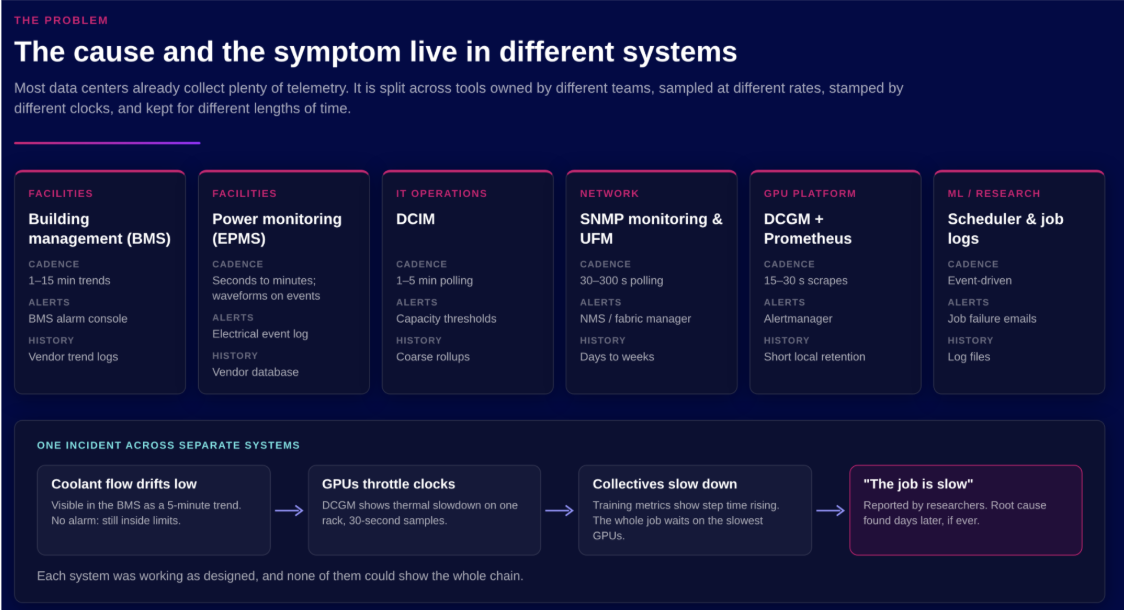
Eight main challenges repeatedly come up when trying to collect data center telemetry in a way that correlates the layers..
Protocol Sprawl
A single site might use SNMP, Modbus, BACnet, Redfish, IPMI, gNMI, OPC UA, MQTT, and Prometheus endpoints. Integrators routinely chain gateways to translate between them. Every translation hop is another place for data to get lost.
High-Cardinality Data
Every GPU ID, NVLink pair, switch port, circuit, and job adds tags, and every tag combination is a separate time series. In a write-up on monitoring more than 500 GPUs, Backend.AI’s team found that a single GPU temperature metric produced 504 series, and some high-cardinality queries ran out of memory as a result.
Mismatched Resolution
Building management trends are often logged every one to 15 minutes, or only when a value changes. SNMP polling typically runs every 30 to 300 seconds. Prometheus scrapes and NVIDIA UFM’s default telemetry runs around every 30 seconds. AI power swings happen every few seconds, so a one-minute average can hide them completely.
Clock Drift
When each system stamps data with its own clock, you can’t reliably line up a coolant excursion with a GPU throttling event after the fact. SNMP makes this worse, because values are usually time-stamped when they reach the collector, which can be some time after the measurement.
Ownership of Systems
Facilities own the BMS and EPMS; IT operations own DCIM and network monitoring; the GPU platform team owns DCGM and Prometheus; ML or research teams own the scheduler and job logs. Each system has its own alerts and history, and each was designed to answer its own team’s questions. This makes it hard to integrate all these different systems from both a technical and simple access perspective.
The Backend.AI team notes that earlier research found ECC and NVLink errors were detected through CPU metrics more often than through GPU metrics. Before one NVLink failure on their own cluster, the earliest warning sign was an application task count on the affected node jumping to about 18 times its normal level. They concluded that no single metric type caught every failure, so you need coverage across layers.
Data Retention Costs
Real-time monitoring needs recent, high-resolution data. Capacity planning, warranty claims, SLA disputes, and billing need months or years of it. Prometheus-style systems are excellent at recent data, but long retention at GPU fleet cardinality usually means bolting on another tier for historical data.
Data Collection
A large data center can run thousands of collection agents across GPU nodes, BMC networks, fabric collectors, and facility gateways. Each one needs proper configuration, including credentials and a suitable polling interval. Configuration drift across a fleet of agents becomes its own source of blind spots.
Security
Facility control networks are segmented from IT for good reason. Facilities teams rarely let IT tools poll their PLCs or power meters directly, so telemetry usually comes through read-only paths like the BMS or EPMS itself, a historian, an OPC UA server, or an MQTT broker at the OT boundary.
What a good telemetry architecture looks like
Whatever tools you choose as part of your tech stack, a few principles apply:
- Collect from every layer, because the cause and the symptom are often in different places. Put any data you need to correlate on one clock, in one store.
- Match resolution to the signal. Collect GPU and rack power at around one second where it matters; most other signals are fine at 15 to 60 seconds.
- Keep fast control local. Protective relays, UPS systems, rack power-smoothing hardware, GPU firmware, and CDU pump loops act in microseconds to milliseconds and should never depend on a database. Telemetry records what they did.
- Store history in open formats, so analytics and ML teams can use it without exporting it first.
- Manage collection as a fleet, with central configuration in place of hand-edited files on individual hosts.
How fast each control loop runs decides where a telemetry platform fits.
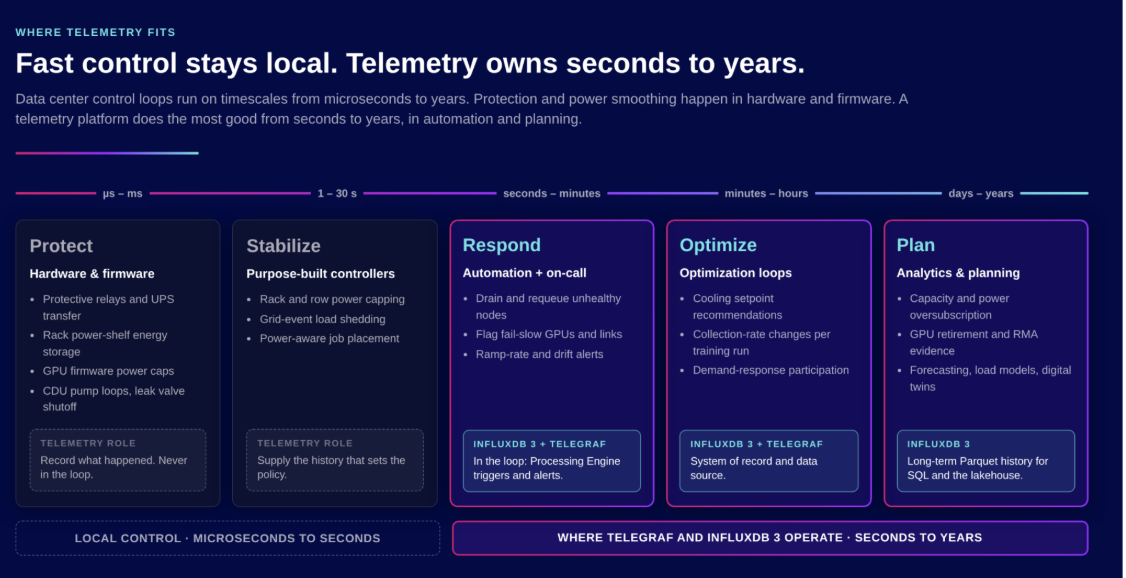
The first two tiers, protecting and stabilizing, belong to hardware and dedicated controllers. A telemetry platform supplies the history that shapes their policies, but it is not in their loop.
From seconds upward, telemetry takes over. Automation can act within seconds to minutes, for example by draining and requeueing an unhealthy node or flagging a fail-slow GPU. Over longer periods, cooling setpoint optimizers read telemetry every few minutes and recommend changes—which local control systems check before anything happens—and months of history drive capacity planning and hardware replacement.
How Telegraf and InfluxDB 3 fit into a data center telemetry architecture
Telegraf
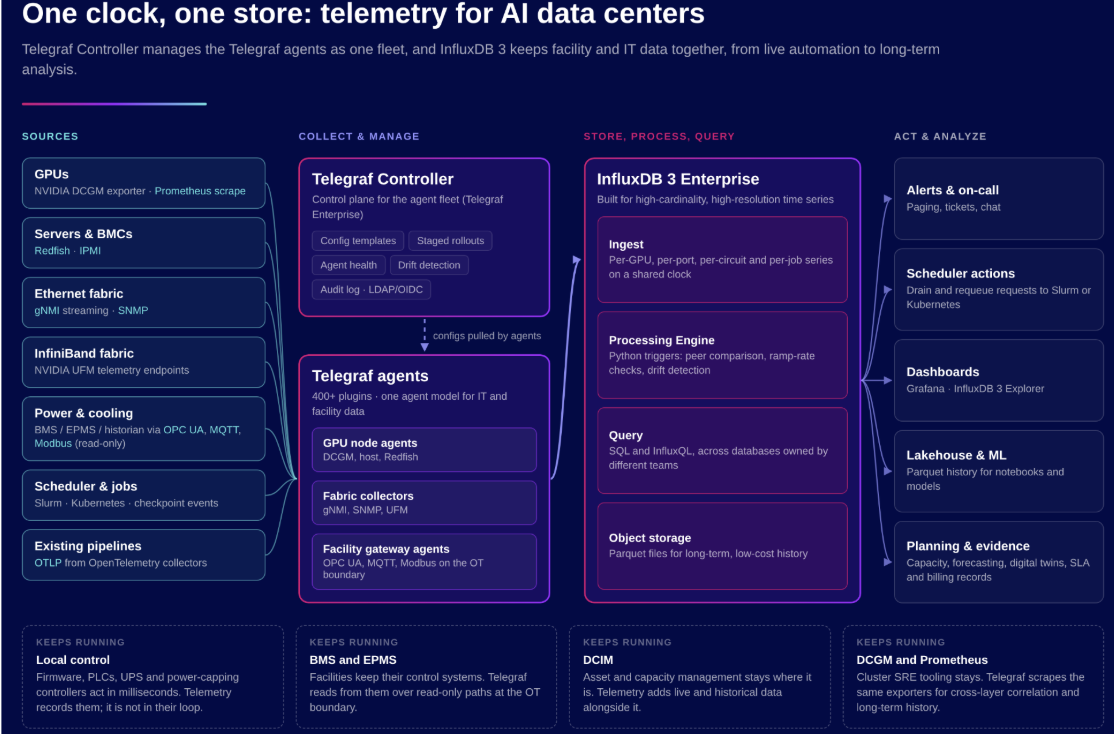
Telegraf is an open source collection agent with more than 400 plugins. It works alongside your existing tools: it collects from the same exporters your GPU team already runs, and it reads facility data over read-only paths without polling control equipment directly. Because every source goes through the same agent, every data point arrives with consistent tags and timestamps.
These are the plugins most useful in a data center:
| Layer | Telegraf plugin | Collects from | Why it matters |
|---|---|---|---|
| Accelerators | Prometheus | NVIDIA DCGM exporter, plus other exporters such as UFM's | Reuses the GPU metrics the platform team already exposes, so there is no second GPU agent to run |
| Accelerators | NVIDIA SMI | GPUs directly, through nvidia-smi | A simple option for smaller clusters that don't run DCGM |
| Compute | Redfish | Server BMCs | Health, power, temperature and fan data from the management controller, even when the operating system is down |
| Compute | IPMI Sensor | Older BMCs | Covers servers that predate Redfish |
| Network | gNMI | Ethernet switches that stream telemetry | Captures short congestion bursts and link flaps that slower polling misses |
| Network and power | SNMP | PDUs, UPS systems, older switches, environmental sensors | The protocol nearly all existing data center hardware speaks |
| Power and cooling | Modbus | Power meters and CDUs, directly or through protocol gateways | Reads the industrial devices common in electrical and mechanical rooms |
| Power and cooling | OPC UA | Facility systems such as the BMS or a historian | A read-only path to facility data that respects the OT network boundary |
| Facility | MQTT Consumer | Facility message brokers and IoT sensors | Subscribes to data the facility side already publishes |
| Workload | Slurm and Kubernetes | Job schedulers and clusters | Adds job and node state, so problems can be tied to the work they affect |
| Any layer | OpenTelemetry | Existing OpenTelemetry collectors | Brings in data from pipelines teams already run, without changing them |
Telegraf can then write everything to InfluxDB 3 or another database of your choice.
Telegraf Controller: run data collection as a fleet
Telegraf Controller is a control plane for Telegraf agents. Agents pull their configurations from it, and operators get one view of the whole fleet. Configuration templates cover each layer (GPU nodes, BMC collectors, fabric collectors, and facility gateways). Staged rollouts let changes reach one rack or hall before every site, and agent health checks and drift detection catch broken or misconfigured agents before they leave a blind spot.
Telegraf Enterprise adds support for tens of thousands of agents, unlimited configurations, audit logging, LDAP/OIDC, and commercial support. The free Controller tier covers up to 100 agents and 20 configurations.
Telegraf Controller also lets you set collection resolution per rack or per job. Collecting every signal at one second is expensive. With templates and staged rollouts, you can push a one-second power and GPU profile to the racks running a large training job, or to a rack you’re investigating, and roll it back when you’re done.
InfluxDB 3
InfluxDB 3 is built for high-cardinality, high-resolution time series data, so per-GPU, per-port, per-circuit and per-job series can live together without being trimmed to fit. You query it with SQL or InfluxQL. GPU and facility data can sit in separate databases, owned by separate teams, and still be queried together.
Data is stored in object storage, which keeps long-term history inexpensive and lets lakehouse and ML tools read it directly. InfluxDB 3 can be run self-hosted, which matters for on-premises and air-gapped AI sites where SaaS monitoring isn’t an option.
The Processing Engine runs Python code inside the database, either on a schedule or as new data arrives. That makes it a natural fit for the response tier: checks and automation that need to run within seconds to minutes, next to the data.
| Processing Engine feature | What it does | How it helps in a data center |
|---|---|---|
| Data write triggers | Runs code as soon as new data is written to a table | React to a GPU error event or a leak-sensor reading as it arrives, without waiting for the next dashboard refresh |
| Scheduled triggers | Runs code at a fixed interval or on a cron schedule | Compare each GPU with the others in its node every 30 seconds to catch fail-slow hardware, or produce daily health reports |
| HTTP request triggers | Exposes a plugin as an HTTP endpoint | Lets other tools, such as a scheduler or a runbook, ask for a node's health status on demand |
| Results written back as data | Plugins store their findings as new time series | Health flags can feed alerts and dashboards from one source, and an automation script can turn them into drain requests to Slurm or Kubernetes |
| Trigger arguments | Passes settings, such as thresholds, when a trigger is created | Tune the same check per cluster or hardware generation without changing code |
| Plugin Library | Ready-made plugins for common tasks such as downsampling and alerting | Get started without writing code, and downsample high-resolution data for long-term retention |
| Python packages | Plugins can use standard Python libraries | Use familiar statistics and anomaly-detection libraries for trend and drift checks |
Data center telemetry use cases
Connecting Power Swings to Training Jobs
With power data from the GPUs up to the UPS in the same store as job and checkpoint events, you can see which jobs produce which load steps, and how often they cycle the batteries. Facilities and platform teams then have a shared, factual starting point for tuning power smoothing, power capping, checkpoint timing, or job placement.
Retiring GPUs Before They Fail
In the Llama 3 run, 30.1% of interruptions were caused by GPU faults (including NVLink) and 17.2% by HBM3 memory. Trending memory errors (ECC errors and row-remapping counts) and HBM temperature per GPU over several weeks produces a short list of devices to pull at the next maintenance window, before they take down a job running across thousands of GPUs. The same history becomes evidence for RMA (return) claims.
Catching Liquid-Cooling Drift
Liquid loops tend to degrade slowly before anything trips an alarm. Trending the worst-flowing branch, filter pressure drop, pump effort, and coolant conductivity, and alerting on rate of change rather than absolute limits, turns a surprise outage into a scheduled repair.
Settling SLA and Billing Questions
When facility and GPU timelines sit in one store, a colocation provider and its tenant can check whether a GPU slowdown started with a cooling event in the hall or inside the tenant’s own hardware. The same records help reconcile power billed per circuit with GPU usage billed per job.
Getting started with InfluxDB and Telegraf for data center telemetry workloads
Most data centers are already collecting the telemetry data they need, but it isn’t available in a way that maximizes its value. As you’ve seen in this article, Telegraf and InfluxDB 3 are valuable tools for solving a number of common problems seen in data centers. Check out the resources below to get started.


